Audio Transcription Systems
Please Note: This Product has been discontinued
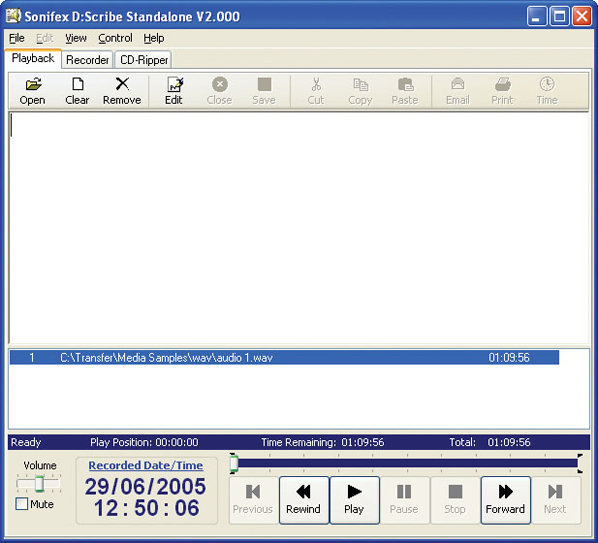 D:Scribe Standalone Play Screen.
Related Links:
DS-UP D:Scribe Standalone V1.0 to V2.0 Upgrade >
D:Scribe Standalone
 The D:Scribe transcription systems consist of two products - D:Scribe Standalone is a package of PC transcription software together with a 3 pedal foot-controller, for simple, fast and effective transcription of pre-recorded audio files. D:Scribe Client & Server software can be used where you are recording using multiple Net-Logs and you want a database system to store, retrieve and transcribe audio.
D:Scribe Standalone is a package of PC transcription software together with a 3 pedal foot-controller, for simple, fast and effective transcription of pre-recorded audio files.
D:Scribe Standalone is the perfect transcription package to use for quick, simple voice-to-text conversion which can be used either with its own text editor, or which can “float” on top of another application, such as MS Word™.
D:Scribe Standalone has all the transcription features of the full Client & Server version, but doesn’t have the management database structure for multiple clients.
The audio controls for D:Scribe Standalone are the same as for the Client & Server version. A foot-pedal is supplied as standard with this package which controls the Play/Pause, Forward & Rewind buttons.
The online spell-checker is available and 12 user defined function keys can be used to enter repetitive material such as names, places and recurring events. The recorded time & date (if transcribing Net-Log audio files) and the current time & date are also available.
Whilst transcribing, the date and time can be edited to show the actual recorded time, to allow transcription events to tie in with the time of recording. A positional Mark can also be added as a reference, either anywhere within the file, or to mark temporarily where you’ve got up to with a transcription in case of interruption.
Finished transcripts can be simply emailed by clicking the on-screen email button, which runs your standard email client to send the text file.
D:Scribe Standalone operates with all MS Windows Media Player™ standard file types : broadcast .wav, .wav, .aif, .aifc, .aiff, .asf, .asx, .wax, .wma, .wmv, .wvx, .wmp, .wmx, .avi, .mpeg, .mpg, .m1v, .mp2, .mp3, .mpa, .mpe, .mpv2, .m3u and .wma. Transcriptions can be made directly from audio CDs (CDA) provided the CD-ROM is fast enough.
MPEG, AVI and WMV video formats are also supported, allowing you to watch and transcribe video footage from an in-built video window.
Built-in Recorder
D:Scribe Standalone has a built-in audio recording screen, capable of recording to compressed MP3 or linear WAV files from any of the recordings sources of your soundcard including Line-In and Microphone.
The recording screen can be used to record audio files using manual start and stop, auto-start recordings using levels (VOX), and also auto-split recordings ranging from 30 seconds to 1 hour each.
Transfer Audio CDs
D:Scribe Standalone has a built-in audio CD ripping capability. This allows pre-recorded audio CDs to be transferred to your PC as compressed MP3 or linear WAV files for playback and transcription.
Technical Specification For D:Scribe |
|||||
Minimum System Requirements |
|||||
| D:Scribe Standalone: | Pentium 3 800MHz, 128Mb RAM Windows XP/Vista |
||||
Equipment Type D:Scribe Standalone |
|||||
| DS-STS3: | D:Scribe Standalone with DS-FPS3 foot-pedal, 3 pedal version with 9 pin serial connector |
||||
| DS-STU3: | D:Scribe Standalone with DS-FPU3 foot-pedal, 3 pedal version with USB connector | ||||
| DS-ST01 | D:Scribe Standalone licence - 1 user licence | ||||
| DS-ST05 | D:Scribe Standalone licence - 5 user licence | ||||
| DS-ST25 | D:Scribe Standalone licence - 25 user licence | ||||
| DS-ST100 | D:Scribe Standalone licence - 100 user licence | ||||
Licencing and Dongles |
|||||
| D:Scribe uses USB dongles to unlock the full features and functionality of the software. The software can be used for demonstration and evaluation purposes without a dongle, but with limited functionality. When using D:Scribe software without a dongle, a screen reminding you of the limited functionality will be shown periodically. | |||||
 Please note all versions of the D-scribe software have known issues under all versions of Windows 7 and installation is not supported on this platform. Please note all versions of the D-scribe software have known issues under all versions of Windows 7 and installation is not supported on this platform. |
|||||