Sonifex Software
Courier Portable Recorder (Please note that this product is no longer available - the following information is available for historic reference)
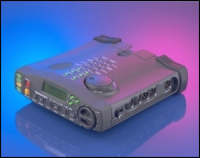 Already in use around the world by major broadcasters, freelance journalists and sound recordists, Courier is one of the most versatile portable recorders on the market. Widely recognised as a groundbreaking product, Courier has been awarded the Millennium Product accolade by the British Design Council in recognition of the advanced nature of its technological innovation and for the imaginative techniques used in its design and development. The Courier has been designed with total ease of use in mind with careful thought going into the layout of the controls. For sheer flexibility and adaptability the Courier is hard to beat and it’s easy to see why :
- At only 1.5kg including media and battery it won't weigh you down.
- Records in most broadcast formats, including linear .wav and mpeg layer 2, providing instant compatibility with most studio editing and broadcast systems.
- Uses PCMCIA hard disks or flashcards.
- No need for audio dubbing - plug the PCMCIA card into your PC and play out directly.
- Built-in, sophisticated, easy to use editing functions.
- No need to race back to the studio if you’re in a remote location. To file reports, connect Courier to a modem or directly to your GSM mobile phone.
- Carry out live reports with the optional ISDN version or with the CO-TBU telephone balance unit.
- Anti-shock, robust packaging using strong shatterproof ABS plastic, with protection buffers to prevent damage.
- Uses widely available rechargeable camcorder batteries, or optional AA cells, which can even be changed whilst recording.
Portable Power With Hot-Swap Batteries
 The days when you had to worry about your recorder failing in the middle of interview are over ! Courier's audible bleep reminds you when to change the widely available rechargeable camcorder battery, or the optional caddy with AA cells. The internal rechargeable battery will give over 1 minute of hot-swap time during which you can change the main battery.
An optional cigar lighter adaptor an provides power in the car and will recharge the Courier's batteries whilst on your way to the next crucial assignment. The integral international mains travel adaptor pack will also ensure that you can operate and charge your Courier from anywhere in the world.
Control At Your Fingertips
 All the controls for Courier are designed for your ease of use. Large, readily identifiable keys have been used with added benefits such as 'feel in the dark' operation and accidental switch-off prevention. A confidence monitor confirms that your recording is safe and a backlit LCD display gives you vital information on the recording levels, battery and disk time remaining.
 A software controlled limiter can be switched in together with a high pass filter for use in noisy surroundings and there are "over level" LEDs for an instant visual check on recording levels. All of this enables you to concentrate on your job not your recorder.
Record in Style with no more audio dubbing
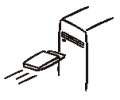 Take advantage of Courier's superior versatility by defining 'Record Styles' to make your report perfectly compatible with the majority of editing and broadcast playout systems. Simply define parameters such as sample rate, file format, compression used and whether mono or stereo, then give your recording style a name such as 'Radio' or 'CD'.
Up to 20 personalised Record Styles can be configured into the Courier. Once you've selected your chosen Record Style and finished recording, plug the PCMCIA disk or flashcard straight into your editing or playout system for instant editing or playback. No need for audio dubbing - what could be simpler?
Why Rush If You Don't Have To?
 There's no need for you to waste time hurrying back to base in order to edit and transmit your report. Stay right where you are!
Courier has sophisticated non-destructive accurate editing capabilities. By using the jog shuttle wheel, and watching the waveform on the graphical display, you can place multiple marks, and perform complex editing simply. A playlist can be compiled by taking pieces from any number of cuts, which can be saved in a number of different formats.
There's no need for you to waste time hurrying back to base in order to edit and transmit your report. Stay right where you are!
Courier has sophisticated non-destructive accurate editing capabilities. By using the jog shuttle wheel, and watching the waveform on the graphical display, you can place multiple marks, and perform complex editing simply. A playlist can be compiled by taking pieces from any number of cuts, which can be saved in a number of different formats.
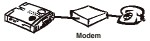 Easier still, once you've finished your report, simply connect Courier to a modem and sit back and relax as it sends your report as data down the phone line.
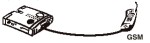 Courier can even send your report over the digital phone network by directly connecting a GSM mobile phone. All of which saves you valuable time and effort.
When Only Live Audio Will Do!
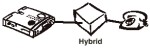 Provide your listeners with all the excitement of live commentary. Connect up the purposely-designed CO-TBU telephone balance unit and you're ready to broadcast down a telephone line, either by using the mic/line inputs or by playing pre-recorded cuts.
Now with USB Connection
The Courier has been enhanced with a USB connection so that fast downloads to the PC can be made. The USB port works in addition to the RS232 serial port and the optional ISDN connection.
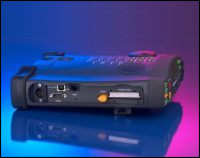 The new version of Courier has a USB B connector supporting USB 1.1 which has a theoretical data rate of 12Mbps. In practise, due to a Windows overhead, Courier USB data transfers have been carried out at 4Mbps which enables downloads to the PC of up to 60 times real-time speed (for ISDN based recordings at 64kbps). Supplied with the new Courier is software to enable connection to Windows Explorer in MS-Windows 98TM and MS-Windows 2000TM. Once the Courier is connected via USB, the Courier hard-disk (or flashcard) looks like another hard-disk on the connected PC system, from which audio files can be transferred, copied and deleted.
The USB connection allows the flashcard or hard-disk used for recording to be permanently stored in the Courier without the need for removal. Files can be quickly downloaded to a PC by USB, the disk wiped and recording started again in a fraction of the time normally needed.
3rd Party Software
Recordings made using the Courier can be downloaded to a PC and then edited using third-party software. Sonifex is not responsible for the content of external websites, nor for the compatability and operation of third-party software.